This is tutorial will demonstrate a very simple way to change color using Adobe Photoshop. We will be changing the color of the “racing stripes” on a car. Here is a what we will accomplish.

First you will need to download an image of a car. I have provided a link to download one from sxc.hu, the site requires that you register, but it will be worth it. They offer tons of royalty free images under various licenses. Download the image of the mustang.

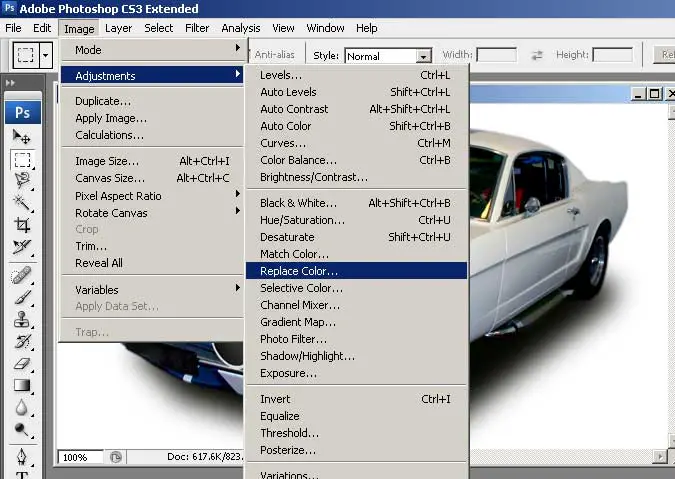
Copy the image into Photoshop. On the menu select Image > Adjustments > Replace Color.
Using the drop tool, select the cars hood stripes.

Now adjust the Hue value to the color of your choice.

Select OK and your image should look like this. If you want to make the color either brighter or more dull you can go back to the replace color tool and adjust the Saturation.

That’s it all it takes to change the color of the stripes of a car. This tutorial can also work for changing the entire color of a car. Keep in mind that this will work best on brighter colors. Try to avoid using stock images that are black or white. While this isn’t the only color change technique, it is the easiest. If there is any interest in more “photo chopping” aka Car Modification tutorials I would be clad to write a few.
