Arrays are a very useful part of VB programming and can be used for many different things. Arrays are a collection of variables that are all the same type. They can be as big or little as you need them to be. For example, lets say I need to use 5 numbers in one of my applications. Instead of using 5 different integers and I can use an integer array. The following code is dimming the array for use in the application (As mentioned in the previous tutorial(s) any variable that you want to be used by the whole application needs to be dimmed right under the Public Class for the form.):
Public Class frmArrays
Dim intNumber(4) As Integer
End Class
Notice how the intNumber is followed by a number that is enclosed in parenthesis. This number tells the application how large to make the integer. By this I mean we can store 5 different numbers in the integer we just created. (0 counts as one – so 4 actually means five.) To call then we simply put the number of the array we want to retrieve in those parentheses. Now that you know what an array is and what it does, let’s make an example and put it to use. Let’s make our form fist. As usual, I will show two forms, one with the names of the objects on the form, and one showing the normal text.
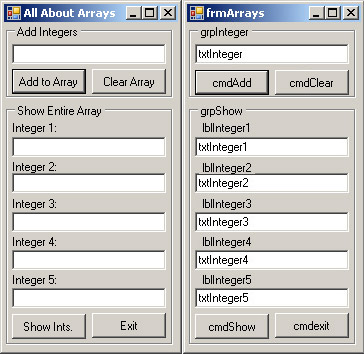
Note, you should make all of the text boxes in the lower portion ReadOnly. There is a ReadOnly setting in the properties. Set it to true.Now that we have our forms made, let’s being coding. As usual, let’s do our exit button first since it’s the easiest. Double-click on it and enter “End” as shown:
Private Sub cmdExit_Click(ByVal sender As System.Object, ByVal e As System.EventArgs) Handles cmdExit.Click
End
End Sub
Our next section of code is the add integer button. We are going to make it add the integer to the next available slot in the array. In order to do this we are going to use another single integer to determine how many times we have added an integer to our array. So we need to Dim the integer times under our Class for the form (as above):
Dim intTries As Integer
Now we need to add the code that will actually check for the array to be used 5 times. Since the integer that we created (intTries) will be starting at zero, we need to stop it once it reaches 5. We also need to make sure that the characters entered into the textbox that we have are indeed only numbers. To do this we will use a neat feature built into VB 2005 and greater called TryParse. It automatically tries to parse the data in the textbox and will fail if it contains text:
Private Sub cmdAdd_Click(ByVal sender As System.Object, ByVal e As System.EventArgs) Handles cmdAdd.Click
If intTries = 5 Then
MsgBox("Array is full! Time to show values.", MsgBoxStyle.Exclamation, "Error!")
Else
If Integer.TryParse(txtInteger.Text, intNumber(intTries)) = False Then
MsgBox("There are letters in the textbox, these cannot be added!", MsgBoxStyle.Exclamation, "Numbers Only!")
Else
intTries = intTries + 1
End If
End If
txtInteger.Text = ""
End Sub
The first thing the code is doing is checking to make sure we have not reached the limit of our integer. It does this by checking our integer that we made. If it is it alerts the user that the array is full. If not it check the text box to see if there are any letters or punctuation in them. The code in that line is looking in the text box and sets the result to intNumber(intTries) – which in this case is intNumber(0). If there are no letters it will simply set it to whatever is in the textbox. If there are letters it will set it to zero. Our code only increments intTries up by one IF the textbox contains only number. The next time around it will be storing the integer to intNumber(intTries) again but this time it will be equal to intNumber(1). Lastly it blanks out our textbox for entry of another number. Now we need to set the code to show the array in our text boxes that we made on the bottom part of the form.
Private Sub cmdShow_Click(ByVal sender As System.Object, ByVal e As System.EventArgs) Handles cmdShow.Click
txtInteger1.Text = intNumber(0)
txtInteger2.Text = intNumber(1)
txtInteger3.Text = intNumber(2)
txtInteger4.Text = intNumber(3)
txtInteger5.Text = intNumber(4)
MsgBox("Integers need reset. Please click reset array to start over.", MsgBoxStyle.Exclamation, "Complete!")
End Sub
All this code does is set the text of the textbox equal to one of the integers in the array and alerts the user to reset the array before trying to add more integers to it. Now the last thing we need to do is add the code to the clear button.
Private Sub cmdClear_Click(ByVal sender As System.Object, ByVal e As System.EventArgs) Handles cmdClear.Click
intTries = 0
intNumber(0) = 0
intNumber(1) = 0
intNumber(2) = 0
intNumber(3) = 0
intNumber(4) = 0
txtInteger1.Text = ""
txtInteger2.Text = ""
txtInteger3.Text = ""
txtInteger4.Text = ""
txtInteger5.Text = ""
End Sub
This sets all integers back to zero and blanks out all of the text boxes on the bottom part of the form. This concludes the code we need to write. In the next tutorials I will show you how to prevent writing a 0 to each integer by using a Do, While statement to get it done easier. Now, let’s test our program. If you type in numbers and letters into the box and hit add to array you should see the following:
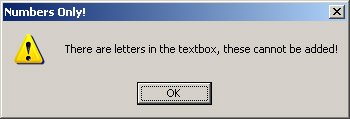
Now you should be able to add integers to it until you get the following box to alert you that it is full:
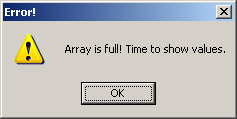
One the array is full we should now be able to show the contents of it in our boxes below. Click on Show Ints. to populate the boxes and you will get this reminder:
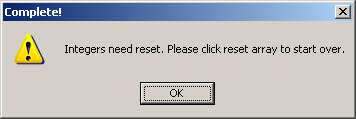
Once you click away you should see the integers that you typed in as shown below:
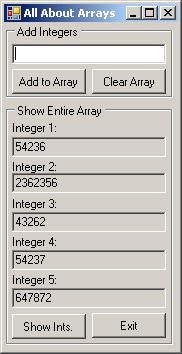
Now that you have seen them all you should be able to hit clear and start all over again. This concludes this tutorial and thank-you for reading.
M.Gold on December 12, 2008 at 4:33 am
Hi,
Please send me the Next , Previous , First command buttons codings in vb6.0 with Microsoft Access.and using the Data Report & Data Environment.
need for project.Please send to my E-Mail Address.
Thank You.
[Reply]
Wilson Ochuko on October 2, 2009 at 12:21 pm
I need a complete materia on how to work with array programs in VB 6.0 to enablimg
[Reply]
Prabhanjan Bharti on October 22, 2009 at 11:57 pm
Hi
I have 2 question for answer. Plz Help me
Q.1:- Give an array of numbers. Find out that number which occurs only once in the array.
Q.2:- Give 2 arrays A and B. Array “A” contains all the element of “B”. But one more element extra. Find out the extra element.
Thank U
[Reply]
Rob on January 3, 2010 at 1:47 pm
Hello,
I am making a project (Waiting List) where I am using arraylist(2) therefor I am entering 3 pieces of information.
The information in the arraylist is then sent to a listbox
lstWaiting.Items.Add(String.Format(“{0} To {1} = {2:c}”, _
arraylist(0), _
arraylist(1), _
arraylist(2)))
Then when the item in the listbox is double clicked it removes the information from the listbox and sends it to textboxes
Do While lstWaiting.SelectedIndex > -1
lstWaiting.SelectedItem = lstWaiting.Items.Item(lstWaiting.Items.Count – 1)
lstWaiting.Items.RemoveAt(lstWaiting.SelectedIndex)
Loop
txtArrayPickUp.Text = arraylist(0)
WaitPickUp = txtArrayPickUp.Text
txtArrayDropOff.Text = arraylist(1)
WaitDropOff = txtArrayDropOff.Text
txtArrayPrice.Text = arraylist(2)
WaitPrice = txtArrayPrice.Text
Now I could empty and re use the array to add 3 more pieces of information however, what if I have to keep that first array loaded and left on the list but had to add more information into more separate arrays and once the first arraylist becomes used (deleted from listbox and entered into textbox) I can then reuse it. How could I code that? The redim would be useless because once I delete the item from the listbox the array will be deleted and reused. Can anyone help me out?
[Reply]
Mike Maguire on January 3, 2010 at 2:37 pm
Rob,
Is there a reason you want to load them into separate arrays rather than just managing the list you already have? One of the benefits to arrayLists over arrays are the expandability. They will re size themselves based off information being changed within the collection.
You can use the Add() method to add information to the list:
arraylist.add(“somevalue”)
and you can use the Remove() or RemoveAt() methods to remove a values from the list. This will remove the values for a given key and the next value added will get assigned that key.
arraylist.Remove(“SomeValue”)
arraylist.RemoveAt(1)
If this does not help you, then please let me know as I am not totally sure I see what your trying to achieve. Thanks for reading our site and I hope this helps.
[Reply]
PHP Code » Simple VB Code and All About Arrays on March 19, 2010 at 10:18 am
[...] This is one of the many tutorials that you can use to learn the basics of VB. These tutorials will help lay the groundwork so you can move on to more advanced programming. In this tutorial, we look at arrays and how they are used in VB programming. Simple VB Code and All About Arrays [...]
programmingandcomputertutorials » Blog Archive » Simple VB Code and All About Arrays on March 19, 2010 at 10:19 am
[...] This is one of the many tutorials that you can use to learn the basics of VB. These tutorials will help lay the groundwork so you can move on to more advanced programming. In this tutorial, we look at arrays and how they are used in VB programming. Simple VB Code and All About Arrays [...]
Simple VB Code and All About Arrays « phpcode on March 19, 2010 at 10:20 am
[...] advanced programming. In this tutorial, we look at arrays and how they are used in VB programming. Simple VB Code and All About Arrays Comments [...]
Simple VB Code and All About Arrays « Tutorials on March 19, 2010 at 10:21 am
[...] advanced programming. In this tutorial, we look at arrays and how they are used in VB programming. Simple VB Code and All About Arrays [...]
Tutorials » Simple VB Code and All About Arrays :: iBlog on March 19, 2010 at 10:25 am
[...] advanced programming. In this tutorial, we look at arrays and how they are used in VB programming. Simple VB Code and All About Arrays « Using PHP to update a [...]
PHP Code » Blog Archive » Simple VB Code and All About Arrays on March 19, 2010 at 10:26 am
[...] This is one of the many tutorials that you can use to learn the basics of VB. These tutorials will help lay the groundwork so you can move on to more advanced programming. In this tutorial, we look at arrays and how they are used in VB programming. Simple VB Code and All About Arrays [...]
Tutorials » Blog Archive » Simple VB Code and All About Arrays on March 19, 2010 at 10:26 am
[...] This is one of the many tutorials that you can use to learn the basics of VB. These tutorials will help lay the groundwork so you can move on to more advanced programming. In this tutorial, we look at arrays and how they are used in VB programming. Simple VB Code and All About Arrays [...]
Learn Computer Tutorials » Blog Archive » Simple VB Code and All About Arrays :: iBlog on March 19, 2010 at 10:27 am
[...] This is one of the many tutorials that you can use to learn the basics of VB. These tutorials will help lay the groundwork so you can move on to more advanced programming. In this tutorial, we look at arrays and how they are used in VB programming. Simple VB Code and All About Arrays [...]
Simple VB Code and All About Arrays « Computer Help Tutorials and Tips on March 19, 2010 at 10:29 am
[...] Simple VB Code and All About Arrays By terpdo This is one of the many tutorials that you can use to learn the basics of VB. These tutorials will help lay the groundwork so you can move on to more advanced programming. In this tutorial, we look at arrays and how they are used in VB programming. Simple VB Code and All About Arrays [...]
Simple VB Code and All About Arrays « tutorials on March 19, 2010 at 10:29 am
[...] This is one of the many tutorials that you can use to learn the basics of VB. These tutorials will help lay the groundwork so you can move on to more advanced programming. In this tutorial, we look at arrays and how they are used in VB programming. Simple VB Code and All About Arrays [...]
PHP Code » Simple VB Code and All About Arrays :: iBlog on March 19, 2010 at 10:31 am
[...] advanced programming. In this tutorial, we look at arrays and how they are used in VB programming. Simple VB Code and All About Arrays « Simple Computer “Tune-up” Using [...]
Simple VB Code and All About Arrays « learncomputertutorials on March 19, 2010 at 10:32 am
[...] This is one of the many tutorials that you can use to learn the basics of VB. These tutorials will help lay the groundwork so you can move on to more advanced programming. In this tutorial, we look at arrays and how they are used in VB programming. Simple VB Code and All About Arrays [...]
Simple VB Code and All About Arrays « programmingandcomputertutorials on March 19, 2010 at 10:33 am
[...] This is one of the many tutorials that you can use to learn the basics of VB. These tutorials will help lay the groundwork so you can move on to more advanced programming. In this tutorial, we look at arrays and how they are used in VB programming. Simple VB Code and All About Arrays [...]
Balıkesir Üniversitesi Tutorials on March 19, 2010 at 10:38 am
[...] This is one of the many tutorials that you can use to learn the basics of VB. These tutorials will help lay the groundwork so you can move on to more advanced programming. In this tutorial, we look at arrays and how they are used in VB programming. Simple VB Code and All About Arrays [...]
Tutorials » Simple VB Code and All About Arrays on March 19, 2010 at 10:42 am
[...] This is one of the many tutorials that you can use to learn the basics of VB. These tutorials will help lay the groundwork so you can move on to more advanced programming. In this tutorial, we look at arrays and how they are used in VB programming. Simple VB Code and All About Arrays [...]
Learn Computer Tutorials » Blog Archive » Simple VB Code and All About Arrays on March 19, 2010 at 10:43 am
[...] advanced programming. In this tutorial, we look at arrays and how they are used in VB programming. Simple VB Code and All About Arrays Posted in Fără categorie No Responses This entry was posted on Vineri, Martie 19th, 2010 at [...]
tutorials › Simple VB Code and All About Arrays on March 19, 2010 at 10:47 am
[...] advanced programming. In this tutorial, we look at arrays and how they are used in VB programming. Simple VB Code and All About Arrays Geschrieben von sideways. Veröffentlicht am Freitag, 19. März 2010 um 15:46. Abgelegt [...]
» Simple VB Code and All About Arrays learncomputertutorials on March 19, 2010 at 10:48 am
[...] This is one of the many tutorials that you can use to learn the basics of VB. These tutorials will help lay the groundwork so you can move on to more advanced programming. In this tutorial, we look at arrays and how they are used in VB programming. Simple VB Code and All About Arrays [...]
» Simple VB Code and All About Arrays on March 19, 2010 at 10:50 am
[...] This is one of the many tutorials that you can use to learn the basics of VB. These tutorials will help lay the groundwork so you can move on to more advanced programming. In this tutorial, we look at arrays and how they are used in VB programming. Simple VB Code and All About Arrays [...]
Simple VB Code and All About Arrays « Programming and Computer Tutorials on March 19, 2010 at 10:50 am
[...] Simple VB Code and All About Arrays By aviaworking This is one of the many tutorials that you can use to learn the basics of VB. These tutorials will help lay the groundwork so you can move on to more advanced programming. In this tutorial, we look at arrays and how they are used in VB programming. Simple VB Code and All About Arrays [...]
Simple VB Code and All About Arrays « phpcode on March 19, 2010 at 10:50 am
[...] advanced programming. In this tutorial, we look at arrays and how they are used in VB programming. Simple VB Code and All About Arrays Comentarios [...]
Simple VB Code and All About Arrays « tutorials on March 19, 2010 at 10:51 am
[...] advanced programming. In this tutorial, we look at arrays and how they are used in VB programming. Simple VB Code and All About Arrays Comentarios [...]
Learn Computer Tutorials » Simple VB Code and All About Arrays on March 19, 2010 at 10:53 am
[...] This is one of the many tutorials that you can use to learn the basics of VB. These tutorials will help lay the groundwork so you can move on to more advanced programming. In this tutorial, we look at arrays and how they are used in VB programming. Simple VB Code and All About Arrays [...]
Booned — Blog — Simple VB Code and All About Arrays on March 19, 2010 at 10:54 am
[...] This is one of the many tutorials that you can use to learn the basics of VB. These tutorials will help lay the groundwork so you can move on to more advanced programming. In this tutorial, we look at arrays and how they are used in VB programming. Simple VB Code and All About Arrays [...]
Simple VB Code and All About Arrays @ PHP Code on March 19, 2010 at 10:54 am
[...] advanced programming. In this tutorial, we look at arrays and how they are used in VB programming. Simple VB Code and All About Arrays Category: Uncategorized You can follow any responses to this entry via RSS. You can leave a [...]
Computer Help Tutorials and Tips » Simple VB Code and All About Arrays on March 19, 2010 at 10:55 am
[...] This is one of the many tutorials that you can use to learn the basics of VB. These tutorials will help lay the groundwork so you can move on to more advanced programming. In this tutorial, we look at arrays and how they are used in VB programming. Simple VB Code and All About Arrays [...]
Simple VB Code and All About Arrays « PHP Code on March 19, 2010 at 10:56 am
[...] This is one of the many tutorials that you can use to learn the basics of VB. These tutorials will help lay the groundwork so you can move on to more advanced programming. In this tutorial, we look at arrays and how they are used in VB programming. Simple VB Code and All About Arrays [...]
Learn Computer Tutorials » Blog Archive » Simple VB Code and All About Arrays on March 19, 2010 at 10:57 am
[...] This is one of the many tutorials that you can use to learn the basics of VB. These tutorials will help lay the groundwork so you can move on to more advanced programming. In this tutorial, we look at arrays and how they are used in VB programming. Simple VB Code and All About Arrays [...]
tutorials on March 19, 2010 at 11:02 am
[...] This is one of the many tutorials that you can use to learn the basics of VB. These tutorials will help lay the groundwork so you can move on to more advanced programming. In this tutorial, we look at arrays and how they are used in VB programming. Simple VB Code and All About Arrays [...]
Simple VB Code and All About Arrays on March 19, 2010 at 11:03 am
[...] advanced programming. In this tutorial, we look at arrays and how they are used in VB programming. Simple VB Code and All About Arrays Posted by alfovalxy Uncategorized Subscribe to RSS [...]
Simple VB Code and All About Arrays « computerhelptutorialsandtips on March 19, 2010 at 11:08 am
[...] advanced programming. In this tutorial, we look at arrays and how they are used in VB programming. Simple VB Code and All About Arrays Comments [...]
phpcode » Simple VB Code and All About Arrays on March 19, 2010 at 11:09 am
[...] This is one of the many tutorials that you can use to learn the basics of VB. These tutorials will help lay the groundwork so you can move on to more advanced programming. In this tutorial, we look at arrays and how they are used in VB programming. Simple VB Code and All About Arrays [...]
Simple VB Code and All About Arrays « computerhelptutorialsandtips on March 19, 2010 at 11:46 am
[...] advanced programming. In this tutorial, we look at arrays and how they are used in VB programming. Simple VB Code and All About Arrays Comentarios [...]
phpcode » Blog Archive » Simple VB Code and All About Arrays on March 19, 2010 at 11:48 am
[...] This is one of the many tutorials that you can use to learn the basics of VB. These tutorials will help lay the groundwork so you can move on to more advanced programming. In this tutorial, we look at arrays and how they are used in VB programming. Simple VB Code and All About Arrays [...]
Simple VB Code and All About Arrays - Learn Computer Tutorials on March 19, 2010 at 11:51 am
[...] Simple VB Code and All About Arrays Mar.19, 2010 in Uncategorized This is one of the many tutorials that you can use to learn the basics of VB. These tutorials will help lay the groundwork so you can move on to more advanced programming. In this tutorial, we look at arrays and how they are used in VB programming. Simple VB Code and All About Arrays [...]
Programming and Computer Tutorials - Simple VB Code and All About Arrays on March 19, 2010 at 11:52 am
[...] advanced programming. In this tutorial, we look at arrays and how they are used in VB programming. Simple VB Code and All About Arrays Categorized in [...]
Simple VB Code and All About Arrays || Tutorials on March 19, 2010 at 11:55 am
[...] advanced programming. In this tutorial, we look at arrays and how they are used in VB programming. Simple VB Code and All About Arrays var addthis_language = [...]
Simple VB Code and All About Arrays – phpcode on March 19, 2010 at 12:04 pm
[...] This is one of the many tutorials that you can use to learn the basics of VB. These tutorials will help lay the groundwork so you can move on to more advanced programming. In this tutorial, we look at arrays and how they are used in VB programming. Simple VB Code and All About Arrays [...]
Balıkesir Üniversitesi PHP Code on March 19, 2010 at 12:07 pm
[...] This is one of the many tutorials that you can use to learn the basics of VB. These tutorials will help lay the groundwork so you can move on to more advanced programming. In this tutorial, we look at arrays and how they are used in VB programming. Simple VB Code and All About Arrays [...]
Fernando Sweeney wrote a new blog post: Simple VB Code and All About Arrays | Free Blog Hosting on March 20, 2010 at 3:37 am
[...] Fernando Sweeney wrote a new blog post: Simple VB Code and All About Arrays Posted: 20th March 2010 by Free Blog – Site Wide Activity in Free Blog 0 Fernando Sweeney wrote a new blog post: Simple VB Code and All About Arrays This is one of the many tutorials that you can use to learn the basics of VB. These tutorials will help lay the groundwork so you can move on to more advanced programming. In this tutorial, we look at arrays and how they are used in VB programming. Simple VB Code and All [...] [...]
Simple VB Code and All About Arrays – Tutorials on April 6, 2010 at 3:26 am
[...] This is one of the many tutorials that you can use to learn the basics of VB. These tutorials will help lay the groundwork so you can move on to more advanced programming. In this tutorial, we look at arrays and how they are used in VB programming. Simple VB Code and All About Arrays [...]